JL55 Maya Deposit & InstaPay Bank Cashier: High-Limit PHP Transfers
21+ Responsible Gaming • October 2026₱100 Min Maya Deposit • ₱50,000 Single InstaPay Cap • 4-8 Min Payout
Open Maya & InstaPay Cashier View All PHP Payment Methods✓ BSP-Aligned InstaPay Transfer 21+ Only • Zero Platform Fees on All Bank & E-Wallet Transfers
| Primary Supported Channels | Maya Wallet, Maya Savings & InstaPay Local Banks |
| Compatible Philippine Banks | BDO, BPI, UnionBank, Metrobank, LandBank, Security Bank |
| Minimum Deposit / Withdrawal | ₱100 Deposit / ₱200 Withdrawal |
| InstaPay Single-Transfer Cap | ₱50,000.00 PHP (BSP Network Standard) |
| Maximum Daily Payout Limit | ₱250,000 PHP (Up to 5x ₱50,000 InstaPay Transfers) |
| Average Payout Speed | 4 to 8 Minutes (24/7 Automated Payouts) |
Works with both standard 09XXXXXXXXX Maya e-wallet numbers and 12-digit Maya Savings account numbers with 99.95% uptime.
Send larger payouts straight to BDO, BPI, UnionBank, and Metrobank accounts without waiting for slow next-day bank clearing.
Keep a verified Maya or bank account linked in your profile so you can top up and cash out right away during GCash maintenance hours.
Why Smart Players Link Maya & InstaPay to Their Cashier Profile
Using only one mobile wallet can slow down your play during 15th and 30th Philippine payday nights when e-wallet traffic gets heavy. Setting up a jl55 maya deposit and withdrawal option alongside your main wallet inside the PHP cashier page gives you a fast, ready backup channel.
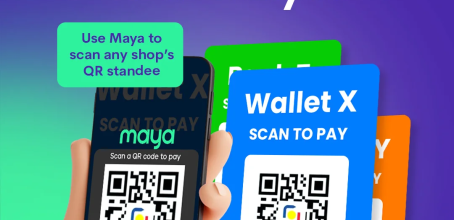
Maya’s wallet system gives higher monthly incoming limits for verified users (up to ₱500,000/month), making it great when your standard wallet gets close to the limit explained on our GCash withdrawal page. Topping up via Maya takes less than 10 seconds using either direct Maya login or QR Ph scanning starting at ₱100.
Plus, linking a local bank account via InstaPay lets live baccarat and slot players send winnings straight into their BDO, BPI, or UnionBank savings accounts without moving money between multiple wallets.
How the ₱50,000 BSP InstaPay Single-Transfer Limit Works
In the Philippines, bank-to-bank and e-wallet transfers run on two systems overseen by the Bangko Sentral ng Pilipinas: InstaPay (instant 24/7 transfers) and PESONet (next-day batch transfers on banking days). To make sure you get your money in 4 to 8 minutes even on weekends and holidays, our cashier sends 100% of payouts through instant InstaPay transfers.
Because InstaPay sets a strict nationwide cap of ₱50,000.00 per single transfer, any single withdrawal request above ₱50,000 cannot go through instant transfer. If you hit a 1,500x multiplier on JILI Super Ace and want to cash out ₱95,000, simply send one withdrawal request for ₱50,000 and a second request for ₱45,000.
Both requests go through one after another in our automated payout queue with zero fees, up to the site’s ₱250,000 daily withdrawal limit.
Avoiding Account Number vs. ATM Card Number Mistakes
When linking a BDO, BPI, Metrobank, or UnionBank account for InstaPay cashouts, always type your 10-to-12 digit Bank Account Number (shown inside your bank’s mobile app), never the 16-digit Visa or Mastercard number printed on the front of your plastic ATM card. InstaPay sends money by bank account number, and typing a 16-digit card number will cause the bank to return the transfer.
Make sure you have also finished any active turnover from our welcome bonus or reload promos before sending your cashout, or check our turnover calculator page to check your balance status.
Maya Wallet vs. Maya Savings: Which Number Should You Enter?
Maya gives Filipino users two different numbers inside the same app: your **11-digit Maya Wallet mobile number** (`09XXXXXXXXX`) and a **12-digit Maya Bank Savings account number**. Knowing which number to type under Account Center > Security > Withdrawal Account prevents failed transfers.
When you pick **Maya (E-Wallet)** in our cashier list, always type your **11-digit `09XXXXXXXXX` phone number** so payouts from ₱200 to ₱50,000 go straight to your main Maya Wallet in 4 to 8 minutes. On the other hand, if you pick **Maya Bank (InstaPay)** from the bank list, type your **12-digit Maya Savings account number**.
Both choices have zero fees from us and support up to ₱500,000 in monthly limits on verified Maya accounts.
Best Times for Instant BDO, BPI, UnionBank & Metrobank Cashouts
Among major Philippine banks, **UnionBank** and **BPI** confirm incoming InstaPay transfers the fastest (usually 3 to 5 minutes day or night). **BDO** and **Metrobank** are just as fast during the day, but they sometimes run short nightly system updates between 11:45 PM and 12:30 AM.
If you request a bank cashout around midnight during a bank update, your payout waits safely in our cashier queue and goes through as soon as the bank finishes—or you can cash out anytime to your bound GCash wallet.
How to Link Maya or an InstaPay Bank Account for Fast Payouts
Tap Add Bank / E-Wallet, pick Maya or your local bank from the list, and check your pre-filled legal name.
Enter your 09XXXXXXXXX number for Maya Wallet or your exact 10-to-12 digit bank account number (never your 16-digit ATM card number).
Use the Cashier tab to top up via QR Ph or ask for an InstaPay cashout up to ₱50,000 per request with 4 to 8 minute arrival.
Quick Speed & Payment Check (payments/maya-instapay)
| Last Checked | |
| Manila Server Speed | 20ms on PLDT, Globe & Smart |
| Main Topic | JL55 MAYA DEPOSIT (jl55 instapay transfer) |
| Deposit & Cashout Limits | ₱100 Min Deposit / ₱200 Min Cashout |
| Usual Payout Time | 4 to 8 Minutes via GCash, Maya & InstaPay |
| Phone App Version | v4.7.2 (38.4 MB Android APK & iPhone Safari) |